
Interactive Instruction Sheet
Campaign Type: Interactive Product Assembly & Customer Support Experience
Audience: Furniture Customers & Product Owners
Delivery Method: Printed Instruction & Assembly Sheets
Experience Type: Interactive Assembly Guidance + AR Instructions + AI Product Support
Technologies: Dynamic QR Codes, Augmented Reality (WebAR), Interactive 3D, AR Video, AI Chatbot, WebAR Catalog, Landing Pages, Reporting Dashboard
Overview
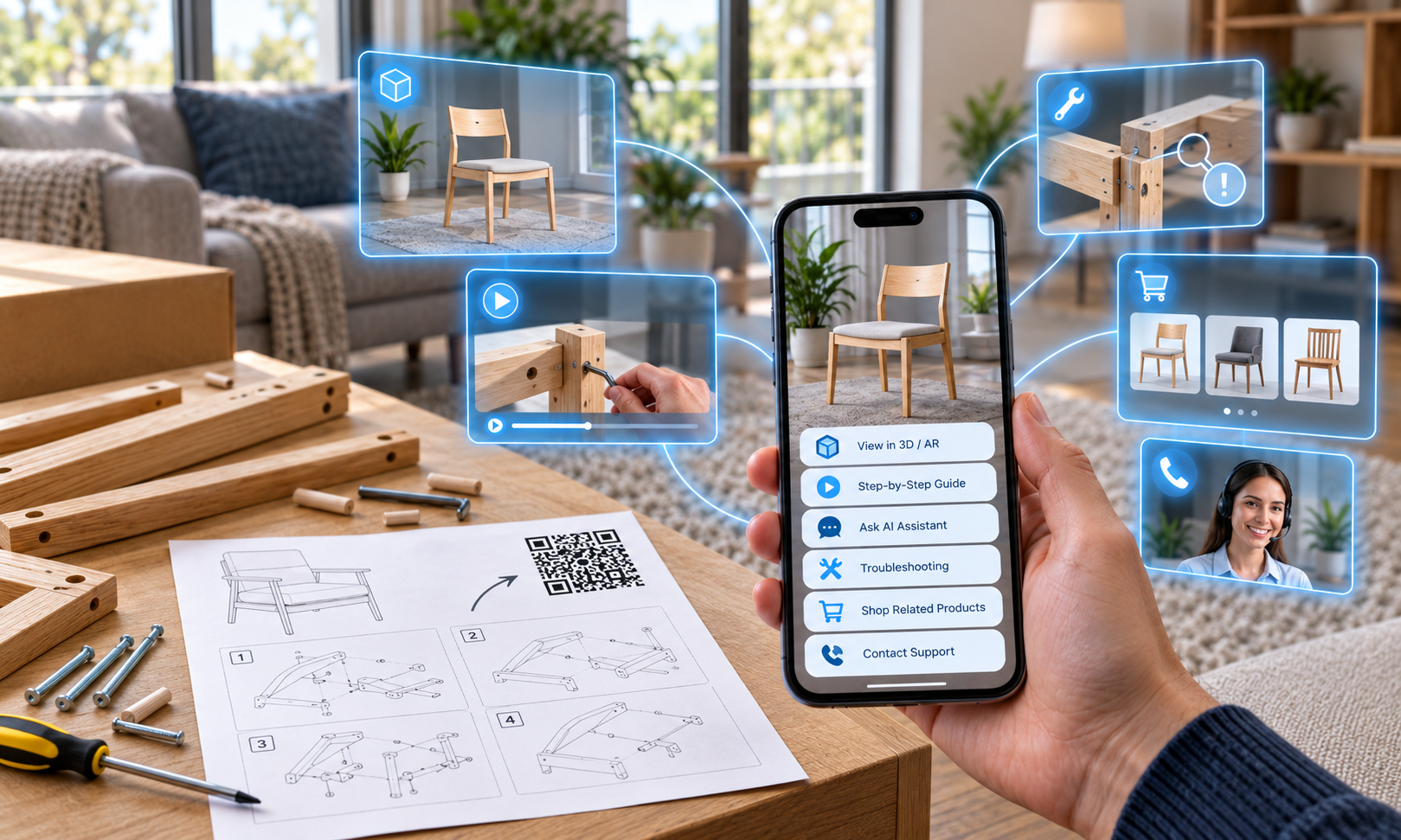
This Use Case illustrates how an Interactive Instruction Sheet could transform traditional flat-pack furniture instructions into a visual, interactive, and intelligent assembly experience.
Printed instruction sheets are included with millions of products because they provide customers with essential information at the point of use. But when assembly is required, static diagrams and written instructions can sometimes leave customers uncertain about components, orientation, sequencing, or what to do when something does not appear to fit correctly.
An Interactive Instruction Sheet would provide another level of assistance.
By integrating a Dynamic QR Code into the printed instructions, customers could instantly access an interactive digital experience from their smartphone. They could view the completed product in 3D and Augmented Reality, explore individual components, follow step-by-step AR video instructions, ask questions through an AI Chatbot, access troubleshooting information, or contact customer service when additional assistance is required.
The same experience could also introduce complementary furniture, accessories, and related products through an interactive AR Product Catalog.
Instead of relying solely on static instructions, customers would have access to additional help exactly when and where they need it.
The instruction sheet would no longer simply tell customers how to assemble the product.
It would help them through the process.
Campaign Background
Flat-pack furniture provides manufacturers and retailers with an efficient way to package, transport, store, and sell furniture that customers can assemble themselves.
For the customer, however, the assembly process can become an important part of the overall product experience.
Traditional instruction sheets typically rely on numbered steps, diagrams, component labels, and symbols to explain the assembly process. When everything is immediately understood, this approach can work effectively.
The challenge occurs when something is unclear.
A component may look similar to another. The orientation of a panel may be difficult to determine. A diagram may not clearly communicate how two pieces connect. The customer may reach a particular stage and question whether the previous steps were completed correctly.
At that point, customers may need to search online for videos, browse support pages, contact customer service, or simply attempt to interpret the instructions themselves.
An Interactive Instruction Sheet would connect the physical instructions directly to additional digital assistance.
The printed sheet would remain an important part of the assembly process, while the interactive experience would provide deeper visual and conversational support whenever required.
Challenge
In this illustrative scenario, launching an Interactive Instruction Sheet would aim to:
- Make flat-pack furniture assembly easier to understand
- Provide visual guidance beyond traditional printed diagrams
- Help customers identify individual components and assembly steps
- Provide immediate answers when instructions are unclear
- Make troubleshooting information easier to access
- Provide a simple pathway to customer support when required
- Reduce routine assembly and product support enquiries
- Improve the overall post-purchase customer experience
- Create relevant opportunities to cross-sell complementary products
Printed instructions would continue to provide the fundamental assembly sequence.
The Interactive Instruction Sheet would extend their capability by giving customers additional tools to understand and complete each stage.
Solution
The Interactive Instruction Sheet experience could function in the following way:
Interactive Access
A Dynamic QR Code could be incorporated directly into the printed instruction sheet included with the furniture.
Scanning the QR Code would launch a mobile-optimized experience directly in the customer’s browser, with no app download required.
Because the QR Code could be associated with the specific furniture product, customers would immediately access relevant instructions and support rather than needing to search a website for the correct model.
3D Product Visualization
Before beginning assembly, customers could explore an interactive 3D model of the completed furniture.
They could:
- Rotate the product
- View it from different angles
- Zoom into specific areas
- Understand how components fit together
- Examine the finished assembly
The same 3D model could also be viewed in Augmented Reality, allowing the customer to visualize the completed furniture within their own room.
This could provide useful context before assembly begins and help customers better understand what they are building.
Interactive Component Touchpoints
The 3D experience could include interactive touchpoints positioned around specific components.
Customers could select these touchpoints to access information such as:
- Component identification
- Part numbers
- Correct orientation
- Connection points
- Required hardware
- Relevant assembly steps
This would allow customers to visually explore areas of the furniture that may be difficult to interpret from a two-dimensional diagram.
Step-by-Step AR Video Instructions
Customers could access video guidance corresponding with individual stages of the assembly process.
Instead of interpreting a static illustration alone, they could see how a particular step should be completed.
AR Video instructions could demonstrate:
- Correct component positioning
- Which fasteners should be used
- How components connect
- Correct tool usage
- Assembly sequence
- Important checks before proceeding
Customers could move through the instructions at their own pace and revisit individual steps whenever necessary.
AI Assembly Assistant
An integrated AI Chatbot could provide conversational assistance when customers encounter something they do not understand.
They could ask questions such as:
- Which screw should I use for this step?
- Which way should this panel face?
- Where does this component go?
- What should I do if the holes don’t line up?
- Can I go back and correct an earlier step?
- Where can I find a replacement part?
Rather than searching through FAQs or unrelated online content, customers could ask a question within the product-specific experience.
The AI Assistant could be grounded in approved product information and assembly instructions, helping keep responses relevant to the product being assembled.
Troubleshooting & Additional Support
The Interactive Instruction Sheet could provide immediate access to common troubleshooting information.
This could include:
- Frequently encountered assembly issues
- Missing or damaged component guidance
- Replacement part information
- Maintenance advice
- Product care information
- Warranty information
- Additional instructional content
If the available digital support did not resolve the issue, the customer could then be directed toward the appropriate support channel.
Direct Customer Service Access
The experience could provide clear pathways to additional assistance, including:
- Call customer service
- Submit a support request
- Access the relevant support webpage
- Request replacement components
The customer would not need to search independently for the appropriate contact information.
AR Product Catalog
Once the customer had assembled the product, the same Interactive Instruction Sheet could provide access to a WebAR Product Catalog featuring complementary furniture and accessories.
Customers could explore products such as:
- Matching furniture
- Coordinating pieces
- Accessories
- Storage solutions
- Decorative products
- Related collections
Selected products could be visualized in Augmented Reality within the customer’s own space, helping them understand how additional items could complement their new furniture.
The Interactive Instruction Sheet could therefore continue creating value after its primary assembly function had been completed.
Dynamic Content
Because the QR Code would connect to a digital destination, supporting content could be updated without changing or reprinting the original instruction sheet.
Manufacturers and retailers could update:
- Assembly videos
- Troubleshooting guidance
- Frequently asked questions
- Support information
- Product recommendations
- Related accessories
This would allow the support experience to evolve throughout the life of the product.
Engagement Reporting
Furniture brands and retailers could capture insights into how customers interact with the experience, including:
- Number of scans
- Most-viewed assembly steps
- 3D and AR engagement
- Frequently accessed troubleshooting content
- Common AI Chatbot questions
- Customer service actions
- Complementary products explored
- Engagement duration
These insights could help identify stages of the assembly process that generate the most questions or difficulty.
Over time, this information could help brands improve digital support content and potentially inform the design of future printed instructions.
Why Interactive Instruction Sheets Work
An Interactive Instruction Sheet would work because the printed instructions are already positioned exactly where assistance is most likely to be needed: inside the box with the product.
Customers would not be asked to discover a new support channel or download another app.
They could simply scan the instruction sheet when they need additional help.
Interactive 3D would make complex components easier to explore. AR Video could demonstrate assembly steps visually. An AI Assistant could answer product-specific questions conversationally, while troubleshooting resources and direct customer service pathways would provide additional support when required.
This combination could help remove much of the uncertainty and frustration traditionally associated with flat-pack assembly.
The experience would also create value beyond customer support.
Once assembly was complete, the same touchpoint could introduce complementary products and allow customers to visualize those products in their own environment using Augmented Reality.
For furniture brands and retailers, the Interactive Instruction Sheet would therefore have the potential to improve the post-purchase experience while also creating new opportunities for continued product engagement, cross-selling, and upselling.
The instruction sheet would already be in the box.
Interactive Print would simply make it work harder.
Conclusion
The Interactive Instruction Sheet would represent a practical evolution of traditional product instructions.
By combining printed assembly guidance with Dynamic QR Codes, interactive 3D, Augmented Reality, step-by-step video, AI-powered assistance, troubleshooting resources, and direct customer support, furniture brands and retailers could provide customers with help at the exact point it is needed.
For customers, this would mean a clearer and more supportive assembly experience without needing to search elsewhere for answers.
For furniture brands and retailers, it could mean fewer routine support enquiries, greater insight into common assembly challenges, a better post-purchase customer experience, and additional opportunities to introduce complementary products.
Printed instructions would still tell customers what to do.
An Interactive Instruction Sheet could help them do it.
Contact Us if you’d like to learn more about implementing Interactive Instruction Sheets into your marketing.